
Case study
How we deploy PlainShip with PlainShip
The hosted app at app.plainship.dev ships over SSH — atomic releases, vault keys and a rollback we actually use.
Context
PlainShip runs as a hosted product. Our own production hosts are ordinary Linux VPS boxes — not a container fleet and not a managed PaaS. We needed the same path we sell to customers: agentless SSH, readable releases and a vault the team can share without copying private keys between laptops.
Early on, deploys lived in a handful of shell scripts and tribal knowledge. That worked for one engineer. It did not work when more people needed to ship a hotfix, check a log or roll back a bad release without waiting for the person who wrote the script.
We also wanted production to look like the product: if customers open a dashboard to deploy, we should open the same dashboard. Dogfooding forced gaps to the surface faster than any internal wiki.
Before
The cost was not only risk — it was latency. A simple “is staging healthy?” check meant opening SSH tabs, remembering hostnames and reconstructing what ran overnight. Onboarding a new teammate meant walking them through a private README that drifted from reality every month.
- scp and ad-hoc bash for hotfixes, with little shared history
- Deploy keys scattered across laptops
- Rollback meant hoping the previous tarball was still on disk
- Night jobs lived in crontab files no one remembered to document
Why PlainShip
We evaluated keeping everything in CI alone. GitHub Actions is excellent for build and test, but day-to-day ops — opening a shell, re-running a playbook, rotating a secret, rolling back at 2 a.m. — needed a calm UI and a shared vault. PlainShip filled that gap without installing an agent on the application servers.
- Same tool we ask customers to use — dogfood the hosted dashboard
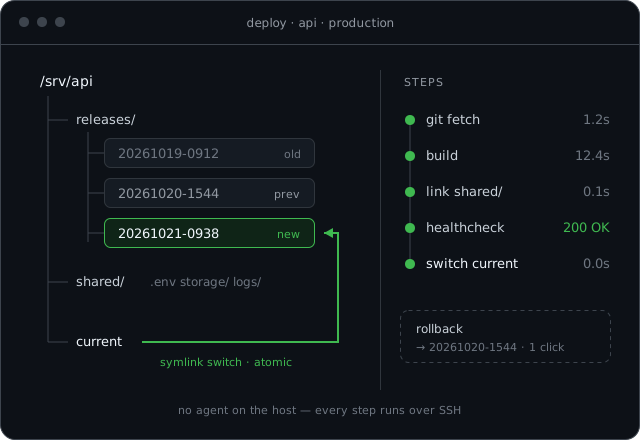
- Atomic symlink releases with healthcheck and one-click rollback
- AES-256 vault for deploy keys and database tokens
- Browser terminal for on-call without opening a pile of SSH tabs
Setup on app.plainship.dev
- 01
Created a project on app.plainship.dev and added production + staging hosts over SSH
- 02
Stored deploy keys and env secrets in the vault
- 03
Connected the app Git repository and configured atomic releases with a healthcheck URL
- 04
Moved recurring health checks onto Pro schedules
Staging and production share the same project with separate host groups, so a dry run on staging uses the same playbook that production will run. Tags and exclusions keep a canary host out of a full fleet push when we need to be careful.
Release directories keep previous builds on disk. When a healthcheck fails, rollback is a symlink switch — not a rebuild race against the clock. Activity history shows who shipped what and when, which replaced the “who ran that?” thread in chat.
After
- < 2 minTypical production release
- 1 clickRollback when a healthcheck fails
- 0 agentsInstalled on application servers
The bigger change was social. Releases became a shared action instead of a private ritual. New teammates get access through roles, not by receiving a private key file. On-call can open a terminal from the same place they watch a deploy log.
What we learned
- Dogfood the hosted product — if a step is painful for us, it will be painful for customers.
- Keep CI for build and test; keep a dashboard for human ops on SSH.
- Atomic releases only help if rollback is one obvious click away.
- A shared vault beats copying deploy keys into chat or personal keychains.
“We stopped treating production as a private script on someone’s laptop. The same dashboard customers see is how we ship.”